
A video podcast is two productions at once
The failure mode is always the same: the episode looks fine and sounds like a conference call, or the other way round. Plan both, or drop one.
- Production
- 4 March 2026
- 7 min
- Kreators, Alfama
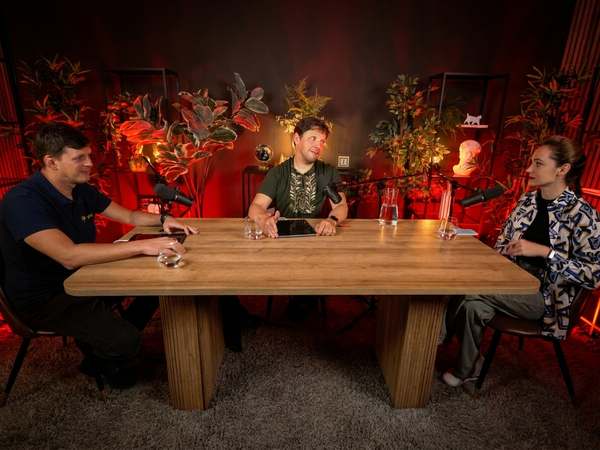
Everything below is what actually happens in a two-hour slot in Alfama, in the order it happens, with the gear that is in the building.
Decide the shape before you arrive
Two people facing each other, three around a table, or one host to camera are three different lighting plans, and you cannot switch between them mid-session without losing twenty minutes. Choose one, and write down how many microphones that implies.
Our set seats up to four people on camera around a wooden table, with a lounge for the guest who is waiting. If your format needs more chairs than that, it is an event, not a podcast.
Record the sound separately, always
Camera audio is a synchronisation reference, not a deliverable. Record each voice on its own track — SM7B or Procaster into the Rodecaster Pro II, or into the Scarlett 18i20 for a larger multitrack session — and keep the camera scratch track for lining things up.
A separate recorder is the cheapest insurance in the room. If a card fails or a camera stops, you still have the episode; audio-only is a publishable podcast, silent video is not.
Light for faces, then for mood
Start with a single key on the speaker and only then add colour. An Aputure 300D through a soft modifier gives a clean, controllable key; the coloured practicals on the set are decoration behind that, not the light doing the work.
Keep every source on the same colour temperature unless you deliberately want the contrast. Mixed white balance is the most common reason amateur footage looks amateur, and it is almost impossible to fix later on skin tones.
Camera settings that survive the edit
We shoot on a Sony FX3, usually with the 50mm f/1.8 for the interview framing and a DJI RS 3 Pro when a shot needs to move. Lock the shutter to double the frame rate, keep the aperture where two faces stay in focus, and resist the urge to shoot everything wide open — a talking head at f/1.8 punishes anyone who leans back.
Shoot the whole session as one continuous take per camera where the card allows. Restarts create sync drift and the temptation to 'fix it in the edit', which is another way of saying nobody will finish the episode.
A realistic two-hour schedule
Two hours is the useful unit, and it is not two hours of recording.
- Arrival, chairs and framing set, microphones placed and gain checked with the actual voices.
- Level test recorded and played back. This is the last moment a problem is cheap.
- Recording. One continuous take where possible; note timecodes for anything to cut.
- Pick-ups, intro and outro, vertical cutdowns shot while everyone is still in position.
- Card offload and a checked copy before anyone leaves the building.
Leave with the files, not with a promise
Copy the cards before the session ends and verify one clip plays back from the copy. A session that is not backed up on site is a session you might have to rebook.
The rest — colour, mix, cutdowns — is post. But the two hours in the room decide whether post is a craft exercise or a rescue operation.
Short answers
- 01
What do I need to record a video podcast?
A camera locked off on the speakers, one microphone per person recorded to separate tracks, a controllable key light, and a backup of the files before you leave. Everything else is refinement.
- 02
How long does a video podcast session take?
Plan two hours for roughly one hour of recorded material: about thirty minutes of setup and level checks, an hour of recording, then pick-ups and file offload.
- 03
Should I record audio on the camera?
Record it as a sync reference, but capture the real audio separately on an interface or recorder so each voice has its own track.
- 04
What camera does Kreators use?
A Sony FX3 with a 50mm f/1.8, Aputure 300D lighting and a DJI RS 3 Pro gimbal, alongside the Rodecaster Pro II, Focusrite Scarlett 18i20 and Zoom H6 for audio.
More from the journal
The Shure SM7B needs more gain than you think
It is the most photographed microphone on the internet and the most badly gain-staged. Here is how we run it in the Alfama podcast room.
How to record a DJ set that is worth sending
Promoters listen for thirty seconds. A phone recording of a room tells them nothing except that you own a phone.
Where Lisbon actually makes things
The city is small enough to cross in half an hour and stubborn enough that each district still does its own thing. Here is who does what.
Come make something in Alfama.
Your need, your hour, Apple Pay. Walk up the hill, press record, and leave with the work done.
Kreators produces. bridgr connects. Kreators is the production studio and event space of bridgr, the creative residence and community in Alfama, Lisbon.